
MIB Views
Agent Settings
When you first start MIB Views, or when you open a new window, you'll be presented with the Agent Settings dialog. When you open new windows, the defaults are initialized to the settings of the window you opened from, making it easy to have multiple windows with the same or only slightly different settings, if desired. You can change settings for the window later by selecting the File → Agent Settings menu item, or by clicking on the  Agent Settings button, or you can open a previously saved agent's configuration using the Open button.
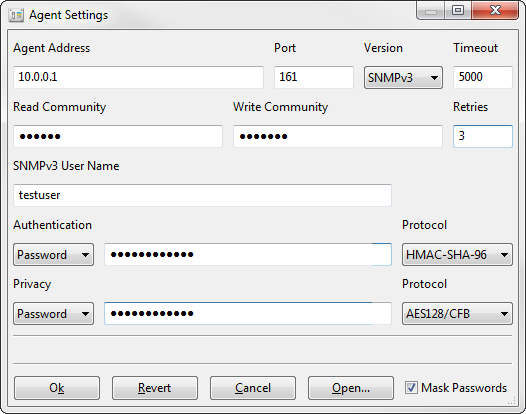
Figure - Agent Settings Dialog
MIB Views supports community-based SNMPv1 and SNMPv2, as well as the current and more secure standard, SNMPv3, with authentication and privacy (encryption). The following settings are available:
- Address
- The IP address or hostname of the agent to manage.
- Port
- The UDP port the agent listens to for requests (normally 161).
- Version
- The SNMP version (SNMPv1, SNMPv2c, or SNMPv3) to use.
- Timeout
- The number of milliseconds to wait after a request is sent and no response is received before retrying (resending) the request or timing out.
- Retries
- The number of times that MIB Views should retransmit the request if no response is received. Does not include the initial request, so a Retries value of 0 means to send the request once and never retry.
- Read Community
- The community string to use for SNMPv1 and SNMPv2c read operations (get, get-next, and get-bulk).
- Write Community
- The community string to use for SNMPv1 and SNMPv2c write (set) operations.
- User Name
- The user name to use for all SNMPv3 operations.
- Authentication
- The authentication secret (password, unlocalized key, or localized key, as selected) and protocol (HMAC-MD5-96 or HMAC-SHA-96) to use for SNMPv3 authentication.
- Privacy
- The privacy secret (password, unlocalized key, or localized key, as selected) and protocol (DES/CBC or AES128/CFB) to use for SNMPv3 encryption.
- Mask Passwords
- If checked (default), protects password and community string text from being visible on screen.
Once you've specified agent settings, click the "Ok" button to try contacting the agent. If a response is received, the settings will be committed and you'll be able to interact with the agent using the main MIB Views window. You can reset any changes you've made to prior committed settings by pressing the "Revert" button. The "Cancel" button is the same, but also closes the Agent Settings dialog. The "Open" button prompts for a saved agent file to open and uses the loaded settings to contact the agent.
Specifying Security Parameters in Hex
Security parameters (community strings, user name, passwords, and keys) can be specified either as plain text or in hex. To specify a value in hex, use colon-delimited hex bytes and surround the value in single quotes (such as '01:23:ab:cd:ef' for a 5-byte string). To suppress conversion from hex, surround the value in pairs of single quotes: the outer pair will be stripped and the remaining string will be treated as literal (such as ''01:23:ab:cd:ef'' for the 16-character inner string).